 हिन्दी
 Azərbaycan
 English
 Indonesia
 Русский (др. страны)
 Русский (Россия)
 Türkçe
 العربية
 简体中文
简体中文
 繁體中文
繁體中文
 日本語
日本語
 한국어
한국어
 Қазақ
Қазақ
You can delete your phone number check history to free up space or hide unnecessary entries. You can perform a full clear or manually delete individual phone numbers.
Full Search History Clear
- Go to the Home tab (the NumBuster home screen)
- Tap Clear at the bottom of the screen
- Confirm the action
Your search history will be deleted.
Delete Individual Phone Numbers from History
- On the home screen, scroll down to the Search History section
- Find the phone number you want in the list of previously checked numbers
- Swipe the phone number row to the left
- Tap the trash icon
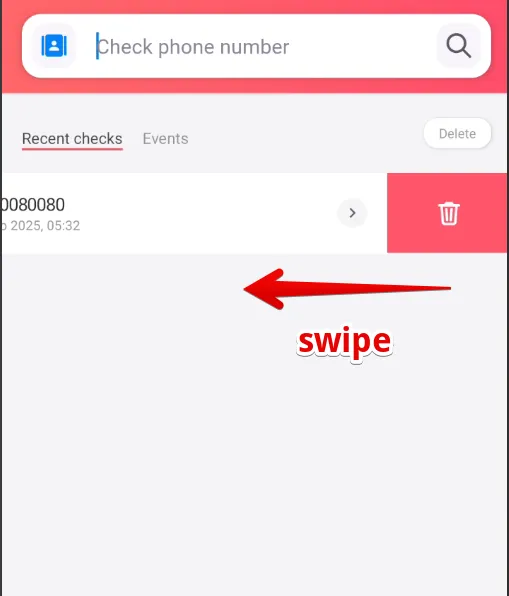
The selected phone number will be removed from your search history.
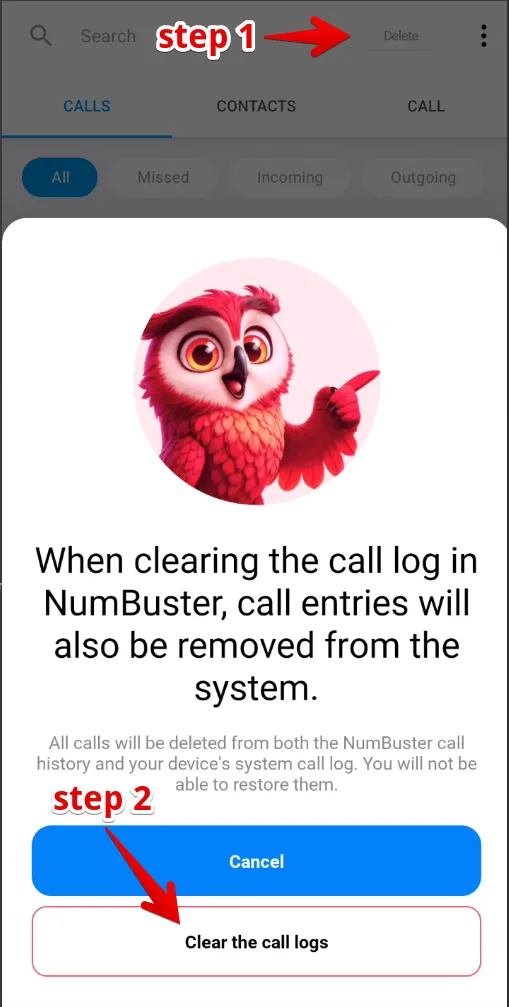
How to Clear the Call Log
- Go to the Calls tab
- Tap the ⋮ (three dots) icon in the top right corner
- Select Clear — Clear Call Log
- Confirm the action in the pop-up window
 फंक्शंस


 Tariffs
 सहायता