 English
 Azərbaycan
 Čeština
 Español
 Français
 Ελληνικά
 हिन्दी
 Indonesia
 Italiano
 Português
 Русский (др. страны)
 Русский (Россия)
 Türkçe
 Українська
 العربية
 简体中文
简体中文
 繁體中文
繁體中文
 日本語
日本語
 한국어
한국어
 Қазақ
Қазақ
Search history stores phone numbers you have recently checked within the app. If you wish to delete these records—for instance, to maintain your privacy—you can clear them quickly.
Instructions
- Open the app and go to the Home screen
- In the Recent checks block tap Clear in the top-right corner
- In the pop-up window select Clear to confirm
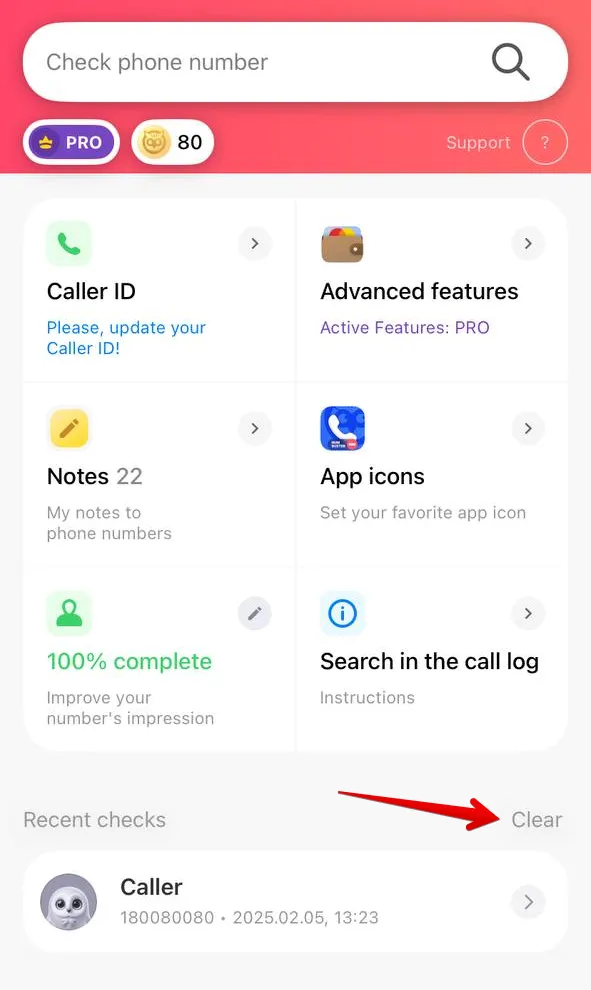
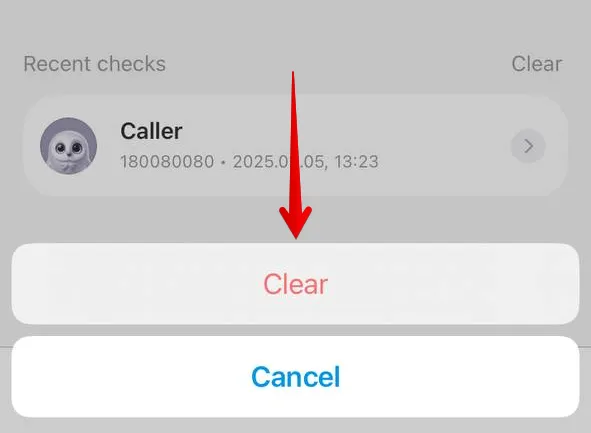
Once completed, the list of checked phone numbers will be empty.
Important! Clearing the history only removes the viewing records on your device. The phone numbers themselves are not blocked by this action. Visit history is deleted separately through Settings > Privacy Settings. You can also hide it automatically with a PRO+ subscription.
 Functions


 Tariffs
 Help
Help